Clearance overlap
Work in progress: This section is still a work in progress — content is being added and revised continuously.
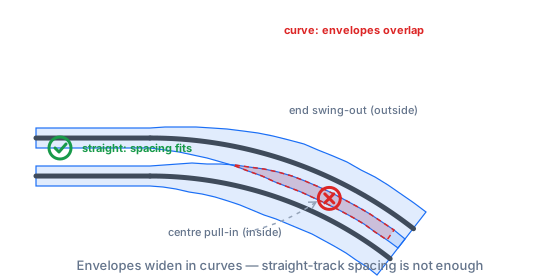
What is checked? Around every track the Trackplanner lays the envelope your vehicles sweep — automatically widened in curves (car ends swing out on the outside, car centres pull in on the inside; both grow with car length and shrinking radius). Where the envelopes of two unconnected tracks overlap, you get a finding plus a red conflict zone in the plan.
Why does it matter? The classic among expensive building mistakes: on the straight the parallel spacing fits, in the curve passing trains sideswipe. Invisible on paper, discovered on the layout at the first meet — when the tracks are already ballasted.
How to fix it: Increase the track spacing in the curve (parallel tool), use larger radii, or shorter vehicles in the train profile. The plan shows the bands as soon as you expand the finding in the plan check.
Numbers & defaults: vehicle width per NEM 102 (H0: 48 mm, editable); curve widening from the car length in your train profile. Without your own trains the rule is paused. You set up your trains in the “Operations” tool, which is coming soon.