Missing staging yard
Work in progress: This section is still a work in progress — content is being added and revised continuously.
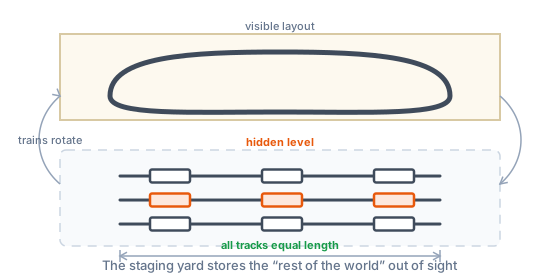
What is checked? If you have set a station in the “Operations” tool and a train profile, but no staging yard, the plan check reminds you (if there is also no track running to the baseboard edge, it folds this into “Connection to the outside world”). If it finds a hidden track bundle that looks like a staging yard, it doesn’t show that as a notice but counts it at the top as an open detail (“staging yard suspected”) — the question is asked by the “Operations” tool (chip “Staging-yard candidate” in the plan).
Why does it matter? Trains don’t exist in a vacuum: without a “rest of the world” the same train circles forever. A staging yard stores trains out of sight and makes traffic feel varied — experienced planners call it the single most important element and advise: make all tracks the same length (= longest train), it simplifies operation enormously.
How to fix it: Confirm the proposal in the “Operations” tool or mark your own tracks as staging there — or consciously ignore it (small shunting layouts don’t need one). The “Operations” tool is coming soon.
Numbers & defaults: notice level; a candidate is at least two parallel tracks on a hidden layer.